Display text over a background image, rather than making the text part of the image

If you are going to display images on your website (and why wouldn’t you?) then you should consider keeping the image, and the text that you want to place on the image, separate. Consider the following banner header that goes across the top of one of my website pages….

The blue banner heading at the top of the page is in fact just an image containing the 3 letters (D, M, and J) over a blue background. The text is then added dynamically when the page is loaded by the browser.

The reason for doing this, and for applying the same logic elsewhere on your website for images which contain text, is two-fold :

  1. The image will generally be a much smaller file size (a few kb) without the text, meaning that your web pages will load much faster for your readers. Although most people now use broadband connections, some don’t and will appreciate websites that load faster. Even broadband users may notice a difference;
  2. Search engines will be able to read the text that you place dynamically onto your images. This can have a great optimising effect. In the example above, the ‘COMPLETE WEBSITE SOLUTIONS….‘ text is actually a <h1> tag (meaning that search engines should consider it a very good guide to what the page is about), and the ‘Hosting, managing, optimising….‘ sub-heading is in fact a <h2> tag. I think this is a pretty cool way of incorporating these tags into your page without necessarily taking up valuable page space;

0 Comments

Don’t duplicate content across websites

When you use Google (and I guess other search engines) to search for, say, ‘business event directory’, you don’t want to see an entire results page showing the same content from a number of different websites.

What you want to see is a range of web pages offering different content on that subject. Right?

Google knows this, and omits content that it thinks is similar to those that it is already displaying. In the example below, you will see that there is a link named ‘Similar’ next to the domain name for each search result. You can click this link if you are interested in seeing all of the ‘duplicate’ results that it has suppressed.

Google SERPS showing similar results

This has important consequences for your SEO…

If you publish an article that you have written on 10 different websites, then there is a chance that only 1 of them will be found in SERPs for any given search term. Now, if you write 10 different versions of that same article and then publish each to a different website, there is a higher chance that you might fill more of those valuable first page search engine results positions – which increases your chance of being found!

Even better, how about trying to include a slightly different set of keywords and phrases in each article as well?

0 Comments

Quick Tip #3 – Use dashes instead of underscores in URL paths

Say you have a website page that is all about french holiday property. You will probably want to include these words in your page name so that it might make sense to search engines (and to any real person that likes to see where they are on your site).

It is better for you to separate each word with a hyphen (-) than it is to separate them with underscores (_). So, www.mysite.com/french-holiday-property would be better than www.mysite.com/french_holiday_property and www.mysite.com/frenchholidayproperty.

It might be a little tricky (but possible) to change the page names on an established site, but it is something worth bearing in mind for new websites, additional pages, and existing sites which haven’t already built up good pagerank and backlinks.

0 Comments

Quick Tip #2 – Don’t worry too much about meta keywords

In the past, it used to be handy to put a bunch of keywords into the keywords meta tag in your html code (for example, <meta name=”keywords” content=”search,engine,optimisation”>). Search engines then used these keywords to help understand what YOU considered most significant on your web page.

Spammers used to stuff this tag full of completely inappropriate keywords. This, coupled with the fact that search engines are now so much better at understanding what a page is about just from the page content itself, has caused Google at least (and possibly others) to stop considering these keywords.

So why not spend all of the time you save by sharpening up the content on your pages?

0 Comments

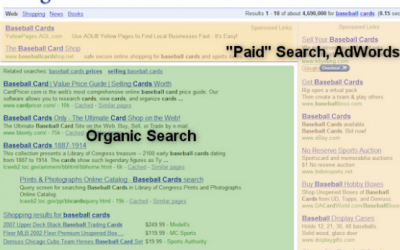
Don’t confuse SEO with Search Engine Marketing (SEM) or Pay-per-click (PPC)

People often confuse the terms SEO (Search Engine Optimisation) with SEM (Search Engine Marketing).

SEO is the principal subject of this weblog, and describes the processes which need to be put in place to enhance the chances of your website being found in organic (normal) search engine listings when your key search terms are used. This generally involves making changes to your website and also developing great inbound links to your website. Your website developer should build in some good basic SEO into your website, but this area develops all the time and so it is wise to allocate at least some of your ongoing budget to this activity.

SEM (also known as Pay-per-click, or PPC) generally means paying Search Engines to show your website details to search engine users as part of what are usually called ‘Sponsored Listings’. Your position in these sponsored listings generally depends on the price you pay for each click, your adverts overall success rate, and the relevance of your chosen keywords to the term being searched for.

SEO generally takes some time to start reaping benefits, and so many website owners choose SEM as an early stage marketing tool to bring visitors to their websites while the SEO is gaining momentum. Once your website is gaining sufficient traffic from your SEO efforts, you might want to scale down (or stop) your SEM. Search Marketing may still have a place in your marketing strategy – for example, to boost traffic when you are running special promotions, or when you have launched a new product or service.

I do use Google Adwords on my own business from time to time, and I also create and manage pay-per-click campaigns on behalf of other clients. It doesn’t always work in terms of ROI (although it always delivers additional traffic), and it is important to be open with clients about this, but the good thing is these campaigns can be easily controlled and so it could be worth investing a little marketing budget to see if it can work for you. Get in touch if you want yours professionally managed!

I have just imported an old blog that I used to run on Blogger. I’ll try to start posting there again, but a lot of the old stuff I posted is still relevant so it’s worth a look… http://blogwithme.biz/blog/practical-adwords/

0 Comments

Quick Tip #1 – Use your web page title tag wisely

Search engines place great emphasis on the words it finds in your website page titles. The page title is the text which is displayed right at the very top of each browser page in what is called the Title Bar area. You can put your own text in this area by placing your text within the HTML title tag when creating or editing your web page. It’s a good idea to have a page title for each page which summarizes, in no more than about 100 characters, what the page is about. Include any useful search terms in this description, but make sure that the title actually makes sense when read as the title will be the headline text displayed in the search engine results page when your site is listed.Title tag example in Google Results Page

0 Comments

Don’t forget that search engines cannot log in to your website!

A typical mistake that people make when writing their sites is to make their most interesting content only available to members who register on the site and who then need to log in to access it with a username and password. Unfortunately, this doesn’t make it accessible from a Search Engine perspective.

From a commercial point of view it might be appropriate to do this – after all, if you have great content that you want people to pay to access, you need to protect it from those who don’t pay. Where it makes less sense is where you don’t charge for the content, but you want to collect information from your website visitor before allowing them access to the content. From a search engine perspective, you might want to consider this very carefully.

When search engines come visit your site to index your pages they cannot log in to get access to all of the protected areas of your site. They will only see the commonly available content, and so only this will be indexed. Think about it – if you have some great content that is hidden behind a log in (or other protected) page, search engines will not know it is there and so will not be able to return it in a results page. This could mean you are missing out on a valuable traffic source, unless…

…you engineer a compromise solution into your website. One such solution might be to make a snippet of each page available to non logged-in visitors, where they have to log in to see the entire page content. As long as you include a sufficiently compelling title to the content and a good smattering of keywords in the leader text, you will have a good chance of attracting search engine visitors to your site (and if your content appears interesting enough, may encourage those visitors to register to see the whole page).

Hint : It’s a really good idea to engineer this in from the start, rather than to try to change things later.

1 Comment

How do I know how people are linking to my site?

In my last post I suggested that it might be a good idea to get everyone who links to your website to link in a consistent fashion. This is easy if you are the one adding the links to other sites, or if you specifically send url’s to your friends or place some ‘link to me’ text on your website, but what if you believe that other site owners have added links to your site but don’t know who? How do you find out who links to your website AND what url they are linking to?

Well, there are a number of ways….

  1. If you use Google Analytics (which I recommend) to monitor your website usage, you can take a look at your content report and see whether any of your pages are appearing more than once in different guises. For example, if you see people arriving at page ‘/’ and at page ‘index.html’ then that is likely to be the same page on your website, but treated as different ones by Google. This means that you are being linked to with the urls www.mysite.com and www.mysite.com/index.html.
  2. Use one of the many backlink checkers – just seach for ‘backlink’ checkers in any search engine. I have used http://www.useseo.com/backlink-analyzer.php, which uses the Yahoo API. This allows you to enter a specific url and then see the sites that link to that page.
0 Comments

Does it matter how people link to my site?

I’m not really dealing with things in a logical sequence here, but this topic is fresh in my mind…

Essentially, your website will attract more search engine traffic if ‘high reputation’ websites link to it. This is likely to be of even more value if the web page that links to yours contains content which is related to the content on your web page. I’ll go into more detail in later posts, but broadly speaking ‘high reputation’ websites are those websites which themselves are linked-to by other high reputation websites!

You may have heard of a term called Pagerank (PR). This is used by Google to determine the reputation of a web page – the higher the page rank, the better. The more sites with a high pagerank that you can get to link to your own site, the more likely you are to appear in a SERP (Search Engine Results Page).

So, onto the main topic of this post – Does it matter how people link to my site? By this, I really mean does it matter whether they link to mysite.com, www.mysite.com, www.mysite.com/index.html etc?

Well, according to Matt Cutts, a well-known Google software engineer, in his excellent WordCamp 2007 talk, it does matter. To google, www.mysite.com is not the same page as www.mysite.com/index.html, even though they are highly likely to be the same page on your website. So, google will give each of them a Pagerank, depending on the sites linking to each of those url’s. The pagerank for each url is likely to be lower than the pagerank that would have been attributed to the page if all links went to the same url ….and as we have learned above, the higher the pagerank for your web page, the more likely it is to feature in the SERP’s.

So, when developing inbound links to your website it sounds like it is better if all links point to exactly the same version of your url. There are various ways to find out which sites link to your pages, and with what url’s, and we will cover this in a later post.

0 Comments

Oh no – not another flipping SEO blog!

Martin Jarvis helps businesses attract more search engine traffic to their websitesAs somebody who has lived and breathed conventional, corporate IT systems for 30 years, I was rather late to the table when it came to website development and marketing. Building computer systems for me in the past just involved satisfying the requirements of large clients to build a mainframe, client-server or PC-based system for use by their own employees. There was never any requirement for the system to be found by people external to the organisation, and so whilst I have excellent software development skills I have had to develop many new skills to help the software that I am now writing (such as websites and weblogs) get discovered by thousands of people.

This blog is all about the lessons I have learned (and am still learning) about optimising websites so that search engine users can easily find my content when it is relevant to what they are searching for. Hopefully, as well as acting as an aide-memoire for me when working on my own, or my clients, websites in the future, it will offer some useful help to others who find themselves in the position I was in 3 or 4 years ago.

…Making sure that these thousands of search engine users engage with my website when they do find it is another matter, and (rest assured) will be the subject of a further blog.

0 Comments